
What is Gstack? Garry Tan's Open-Source Claude Code Virtual Engineering Team Explained
Key Takeaways
Gstack is an open-source skill pack developed by Y Combinator CEO Garry Tan and released in March 2026 for Claude Code. It upgrades a single AI coding assistant into a full virtual engineering team consisting of CEO, Engineering Manager, Designer, QA Lead, and Release Engineer through 13 specialized slash commands. Garry Tan used Gstack to ship over 600,000 lines of production code in 60 days, averaging 10k–20k lines per day. Any developer can install it in 30 seconds. It supports real-browser QA, automated reviews, and one-click shipping. Gstack emphasizes design-first principles and strict gatekeeping, making it the leading agentic AI coding solution of 2026.
What is Gstack?
Gstack is an open-source toolkit created by Garry Tan specifically for Anthropic’s Claude Code. It solves context bloat and inconsistent quality in general-purpose AI assistants by assigning fixed slash commands that make the AI act as different specialized experts.
Gstack is released under the MIT license and completely free. Launched as an experimental project in March 2026, it enables solo developers to achieve team-level productivity.
Its core mechanism is role separation: each skill has independent system prompts and workflows, ensuring professional and auditable outputs.
What core skills does Gstack include?
Gstack provides 13 core skills, each mapped to a clear role and output standard.
| Skill | Role | Core Function |
|---|---|---|
| /plan-ceo-review | CEO/Founder | Redefines the problem, offers 4 expansion modes, and outputs prioritized proposals |
| /plan-eng-review | Engineering Manager | Locks in architecture, data flows, ASCII diagrams, and test matrices |
| /plan-design-review | Senior Designer | Runs 80-point design audit, outputs DESIGN.md and flags AI slop |
| /review | Senior Engineer | Automatically fixes production bugs and tracks code changes |
| /ship | Release Engineer | One-click branch sync, test execution, PR creation with 100% coverage |
| /qa | QA Lead | Executes real user flows using actual Chromium browser, fixes bugs, and generates regression tests |
| /browse | QA Engineer | Real browser interaction with screenshots and navigation |
| /retro | Engineering Manager | Generates weekly reports with LOC, commits, and productivity trends |
These skills integrate with each other to form a complete development pipeline.
How do you install and set up Gstack?
Gstack installs in just 30 seconds with no additional background processes or special permissions required.
You need Claude Code, Git, and Bun v1.0+ installed. In the Claude Code terminal, run: git clone https://github.com/garrytan/gstack.git ~/.claude/skills/gstack && cd ~/.claude/skills/gstack && ./setup.
Then declare the skills in your project’s CLAUDE.md file. For team projects, simply copy the .claude folder to the repository root.
Once configured, type any slash command to instantly invoke the corresponding expert role.
What is the difference between Gstack and regular Claude Code?
Gstack transforms regular Claude Code from a general-purpose assistant into a structured virtual team.
Regular Claude Code relies on ad-hoc prompting, which often leads to context confusion and quality variance. Gstack uses predefined role prompts, review gates, and real-browser integration to guarantee professional and consistent results.
Gstack supports intelligent routing (e.g., CEO does not review infrastructure bugs) and parallel agent sessions, enabling output equivalent to a 10+ person team.
Typical daily output with regular mode is a few thousand lines; Gstack consistently reaches 10k–20k lines per day.
How does Gstack’s browser QA functionality work?
Gstack’s /qa and /browse skills use a real Chromium browser for interactive testing.
Unlike simulation tools, Gstack performs actual clicks, navigation, and screenshots (approximately 100ms per command). The /setup-browser-cookies skill imports real browser cookies to test authenticated pages.
The QA workflow automatically executes user journeys, discovers bugs, atomically commits fixes, and generates regression tests. Garry Tan has confirmed this capability dramatically improves production reliability.
How did Garry Tan use Gstack to boost his productivity?
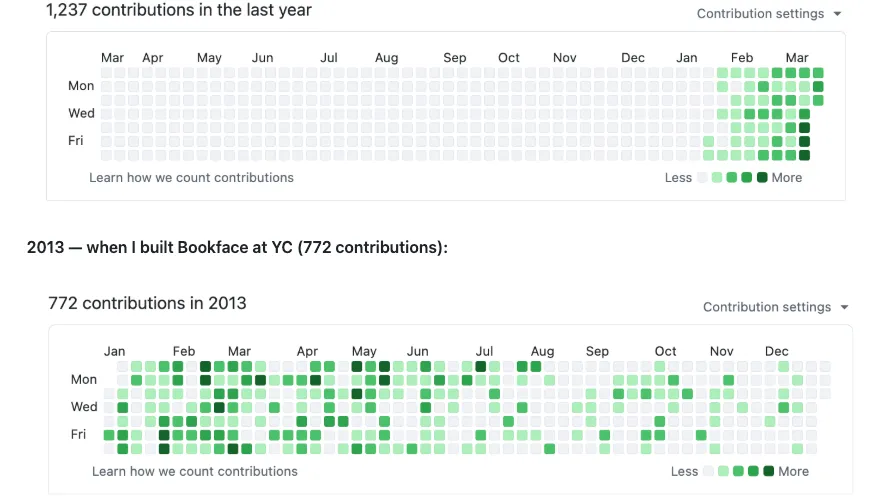
As Y Combinator CEO, Garry Tan shipped over 600,000 lines of production code in 60 days using Gstack, with 35% being test code.
He used /plan-ceo-review to rethink features, /plan-design-review to establish design systems, /qa for browser validation, and /ship for one-click releases. The /retro command provided weekly productivity trend analysis.
Garry Tan publicly stated: “gstack turns Claude Code into the actual engineering team you manage.” This approach allowed him to maintain extremely high output while working full-time as CEO.
What are the real advantages of using Gstack?
Gstack delivers the productivity of a 20-person team to a single developer while enforcing design-system-first development and automatic documentation sync.
It reduces production risk through atomic commits, 100% test coverage, and regression testing. The /document-release skill keeps READMEs and architecture docs perpetually up to date.
Data from March 2026 shows developers using Gstack reduced review cycles by 70% and significantly lowered bug escape rates.
How do you integrate Gstack into real projects?
Developers can integrate Gstack into new or existing repositories by running the setup script.
Recommended workflow: Start with /design-consultation to establish a design system, use /plan-ceo-review to scope features, then complete the release with /ship.
For team collaboration, commit the .claude/skills/gstack folder to the Git repository so all members share identical skill definitions.
Gstack is also compatible with Conductor for multi-agent parallel execution, scaling further for large projects.
Conclusion
Gstack is the most practical AI coding workflow tool of 2026, proven to elevate solo developer productivity to full team level. Install it today from the official GitHub repository and start using role-based development with Claude Code. Run /plan-ceo-review on your current project right now to experience the efficiency leap that a structured AI team delivers.