
OpenMAIC Review: Tsinghua University's Open-Source Multi-Agent AI Classroom Turns Any PDF Into Interactive Lessons in Minutes
Key Takeaways
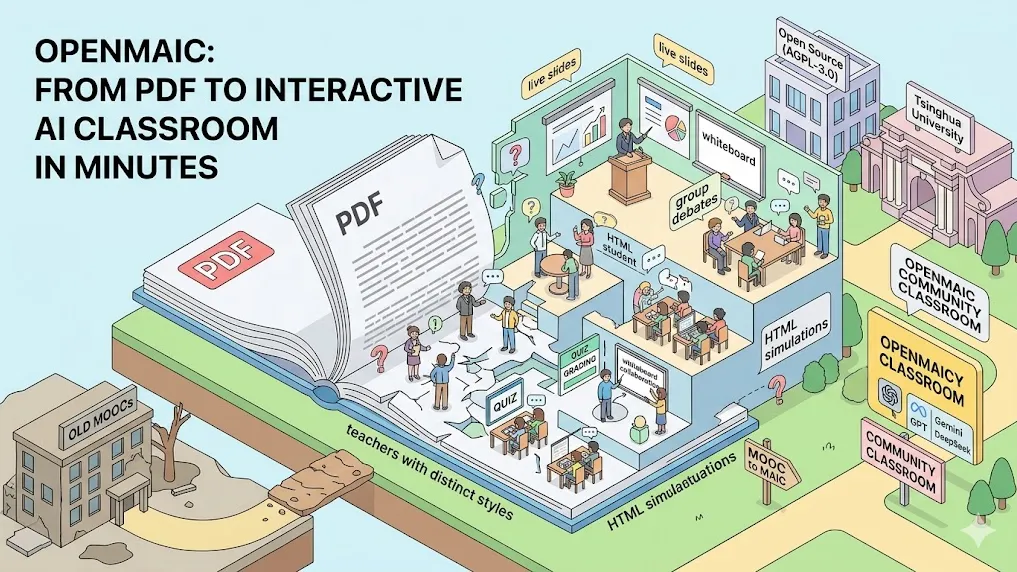
OpenMAIC (Open Multi-Agent Interactive Classroom) is Tsinghua University’s fully open-source (AGPL-3.0) AI education platform that transforms any topic description or PDF document into a complete, immersive multi-agent classroom in minutes. It orchestrates specialized AI agents — teachers with distinct teaching styles, teaching assistants, and interactive classmates — delivering live slides, voice narration, real-time quizzes with instant grading, HTML simulations, whiteboard collaboration, and group debates.
Built with Next.js, LangGraph, and support for OpenAI, Anthropic, Google Gemini, and DeepSeek models, OpenMAIC runs locally, on Docker, or Vercel. Validated with over 700 real Tsinghua students and 100K+ learning records, it achieved 84.1% satisfaction while outperforming traditional MOOCs in engagement and retention. Self-hosting gives full control over data and costs — a free, extensible alternative to proprietary AI tutors.
What Is OpenMAIC?
OpenMAIC is an open-source AI platform developed by Tsinghua University’s MAIC team that creates dynamic, multi-agent virtual classrooms from a single prompt or uploaded document. Unlike single-chat AI tutors, it simulates an entire classroom environment with multiple autonomous agents that interact with each other and the learner in real time.
The platform recreates proven pedagogical elements — lectures, discussions, assessments, and hands-on activities — while adapting to individual student pace and style. Launched in early 2026 and backed by a JCST 2026 research paper titled “From MOOC to MAIC,” OpenMAIC represents the shift from passive video learning to active, social AI-powered education.
How Does OpenMAIC Work?
OpenMAIC follows a two-stage LangGraph-powered pipeline that ensures structured, pedagogically sound lessons.
First, the Lesson Planner agent analyzes the input (PDF or natural-language topic) to generate learning objectives, break content into logical scenes, and sequence activities for optimal retention. Second, the Content Generator creates interactive slides, voice scripts, quiz questions at multiple difficulty levels, and HTML-based simulations.
Once generated, the classroom enters live mode: AI Teacher delivers content with personality-specific styles, AI Teaching Assistant provides scaffolding and feedback, and AI Classmates drive debates and peer learning. Students participate via text, voice (speech recognition), or whiteboard drawing. Everything runs in real time with Server-Sent Events for seamless interaction.
What Are the Core Features of OpenMAIC?
OpenMAIC delivers production-grade educational tools that go far beyond basic chat interfaces:
- Multi-Agent Social Dynamics — Distinct AI teachers, assistants, and classmates engage in natural debates, role-playing, and collaborative problem-solving.
- Multimodal Interaction — Text-to-speech narration, speech recognition for voice input, SVG whiteboard with real-time drawing, spotlight/laser pointer effects.
- Adaptive Assessments — Auto-generated quizzes with instant AI grading, knowledge-gap detection, and personalized remediation paths.
- Interactive Simulations & PBL — HTML-based hands-on experiments and project-based learning modules.
- Export & Sharing — Download as editable PowerPoint (.pptx) or self-contained interactive HTML files.
- OpenClaw Integration — Generate and join classrooms directly from Telegram, Slack, Feishu, or Discord.
All features support English and Chinese, dark mode, and real-time collaboration.
OpenMAIC Technical Architecture Explained
OpenMAIC is engineered for extensibility and production use. The frontend uses Next.js App Router with TypeScript and shadcn/ui components. State management relies on Zustand, while multi-agent orchestration is handled by LangGraph for reliable turn-taking and 28+ action types (speech, drawing, spotlight, etc.).
Document parsing optionally integrates MinerU for accurate extraction of tables, formulas, and OCR. Export uses customized pptxgenjs with MathML support. The entire stack is modular, allowing developers to add new agent personalities, actions, or media providers through simple code extensions.
Supported LLM providers include OpenAI, Anthropic Claude, Google Gemini (recommended: gemini-3-flash-preview for speed), DeepSeek, and any OpenAI-compatible endpoint. Bring-your-own-key model keeps costs transparent and data private.
How to Install and Deploy OpenMAIC Step-by-Step
Installation is straightforward for developers and teams.
-
Clone the repository:
git clone https://github.com/thu-maic/openmaic.git cd openmaic -
Install dependencies (Node.js ≥20, pnpm ≥10 required):
pnpm install -
Configure environment:
cp .env.example .env.localAdd at least one LLM API key (e.g.,
OPENAI_API_KEYorGOOGLE_API_KEY). -
Launch development server:
pnpm devVisit http://localhost:3000.
Production options include Docker Compose (docker compose up --build) or one-click Vercel deployment. For advanced PDF handling, configure MinerU credentials. Full self-hosting takes under 10 minutes and requires no sudo privileges.
OpenMAIC vs Traditional MOOCs and Other AI Tools
| Aspect | OpenMAIC | Traditional MOOC (Coursera/edX) | Single-Agent AI Tutors (ChatGPT/Khanmigo) |
|---|---|---|---|
| Learning Format | Live multi-agent classroom | Passive video + forums | One-on-one chat only |
| Social Interaction | AI classmates + real debates | Limited peer forums | None |
| Content Creation Time | Minutes from PDF/topic | Weeks/months by instructors | Instant but unstructured |
| Personalization | Real-time adaptive grading | Limited | Basic |
| Deployment & Cost | Free self-host + own API keys | Paid subscriptions | Pay-per-token or subscription |
| Data Control | Full ownership | Platform-controlled | Vendor-controlled |
| Multimodal Features | Voice, whiteboard, simulations | Basic video | Text + limited images |
Analysis shows OpenMAIC bridges the engagement gap that plagues MOOCs while offering the customizability missing from proprietary tutors.
Real-World Performance and Student Validation
Tsinghua University tested OpenMAIC across multiple university courses in AI and study methodology. Results from 700+ students and 100K+ learning records show:
- 84.1% overall satisfaction rate
- Significantly higher engagement and knowledge retention compared to traditional online lectures
- Effective reduction in isolation through simulated peer interaction
The JCST 2026 academic paper confirms that LLM-driven multi-agent systems can match or exceed conventional instruction quality at scale.
Common Pitfalls and Advanced Tips for Using OpenMAIC
Pitfalls to avoid:
- High API costs with premium models during long classroom sessions — start with Gemini Flash for balance.
- Poor PDF parsing on complex documents — enable MinerU integration for tables and equations.
- Overloading the default agents — customize personalities in code for subject-specific teaching styles.
Advanced tips:
- Connect via OpenClaw to generate classrooms directly in team chat apps for corporate training.
- Fork the repo and extend the action engine to add domain-specific simulations (e.g., chemistry labs).
- Use the HTML export for offline sharing or embedding in LMS platforms.
- Monitor token usage in the dashboard to optimize model selection per lesson type.
Conclusion
OpenMAIC delivers the first truly open, production-ready multi-agent classroom that makes high-quality interactive education accessible to everyone. Whether you are an educator creating courses, a developer building custom learning platforms, or a team running internal training, the platform’s one-click generation, social dynamics, and full self-hosting set a new standard in 2026.
Clone the GitHub repository today, add your API keys, and generate your first AI classroom in under 10 minutes. Star the project, contribute new agent behaviors, and join the growing community redefining online learning. The future of education is open, interactive, and multi-agent — OpenMAIC makes it available right now.