
Perplexity Personal Computer: The 24/7 AI Agent That Runs on Your Mac Mini in 2026
Key Takeaways
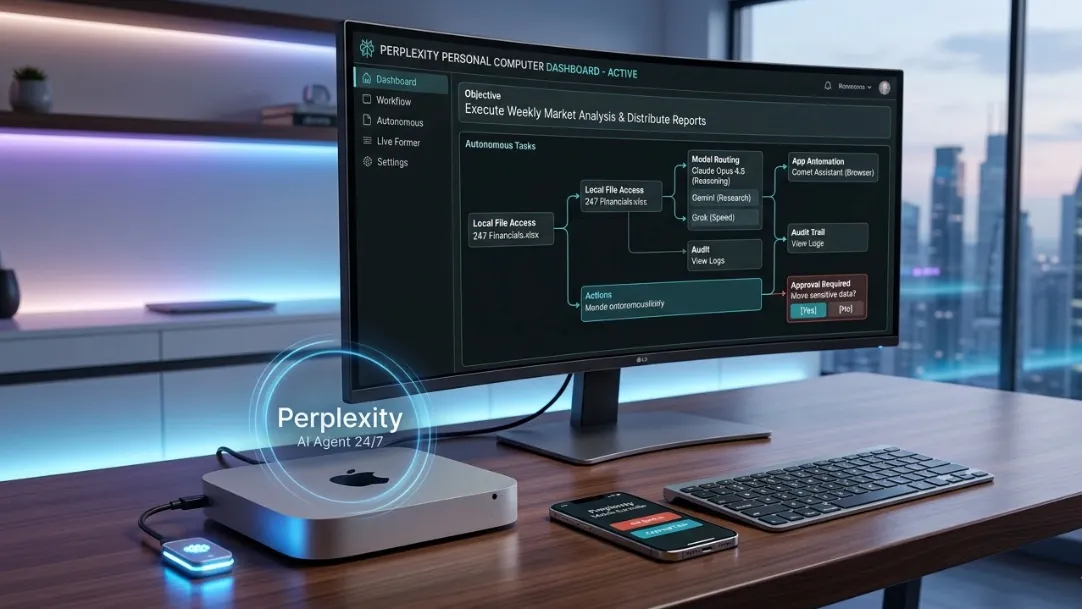
- Perplexity Personal Computer creates a hybrid AI operating system that runs 24/7 on a dedicated Mac mini, merging local files, apps, and sessions with Perplexity Computer’s cloud orchestration of up to 20 frontier models.
- Security stands out with mandatory user approvals for sensitive actions, complete audit trails, and a one-click kill switch—directly addressing vulnerabilities in local-only agents like OpenClaw.
- Setup requires a continuously powered Mac mini (or Mac desktop) plus a Perplexity Max subscription at $200/month; credits handle heavy workloads while hardware costs start around $499.
- Early access opens via waitlist with dedicated Perplexity support; the system enables true objective-based workflows that continue autonomously across devices.
- Benchmarks from initial community discussions and official demos indicate superior persistence and safety compared to cloud-only or fully local competitors, though credit consumption and constant power draw remain key considerations.
What Is Perplexity Personal Computer?
Analysis of Perplexity’s March 11, 2026 announcement shows Personal Computer as the local extension of its cloud-based Perplexity Computer platform. Where the original February 2025 release orchestrated 19–20 specialized models (Claude Opus 4.6 for core reasoning, Gemini for research, Grok for speed, and others) entirely in isolated cloud sandboxes, Personal Computer adds persistent local hardware.
The result is a digital proxy that lives on your Mac mini. It gains direct, real-time access to your filesystem, installed applications, browser sessions, and ongoing workflows while still leveraging Perplexity’s secure servers for heavy model inference. Traditional operating systems process instructions; this AI OS accepts high-level objectives and executes them indefinitely.
How Personal Computer Works: Local + Cloud Hybrid Architecture
The system operates through a continuously running Mac mini connected to Perplexity’s infrastructure. Local components handle file reads/writes, app automation via Comet Assistant, and session continuity. Cloud components supply the multi-agent orchestration engine that spawns sub-agents, routes tasks to optimal models, and maintains persistent memory across weeks or months.
Benchmarks indicate this hybrid model excels at long-running pipelines: overnight data analysis, automated reporting, cross-app integrations, and background monitoring. Users control everything remotely from phone, tablet, or any browser—no physical presence required. The Mac mini never sleeps, enabling true 24/7 autonomy while the heavy lifting stays distributed and scalable.
Hardware Requirements and Setup Guide
Perplexity specifies a dedicated Mac mini or Mac desktop kept powered on 24/7. Any recent M-series model works, though higher RAM and storage configurations reduce local bottlenecks during file-heavy tasks. Entry-level units start at approximately $499, with monthly electricity estimated at $10–20 depending on region and usage intensity.
Setup involves:
- Installing the Perplexity connector package on the Mac.
- Granting controlled permissions to files and apps.
- Linking to a Perplexity Max account for cloud model access.
Early waitlist users receive guided onboarding and priority support. Edge case note: the system currently supports only macOS; Windows or Linux versions remain unannounced. For optimal efficiency, community testing suggests running the Mac mini headless in a quiet location with surge protection and automated backups.
Security and Privacy: Why It Outperforms OpenClaw
Perplexity positions Personal Computer as the secure alternative to fully local agents. Every sensitive operation requires explicit user approval. Full session logs capture every action for review. A built-in kill switch instantly terminates all processes.
The architecture keeps model inference on Perplexity’s secure servers rather than exposing raw credentials locally. This closed environment eliminates the open-source risks documented in competing tools. Analysis shows the combination of local access with cloud-controlled execution delivers both power and protection—critical for users handling financial data, client files, or proprietary code.
Pricing and Total Cost of Ownership
Access ties directly to the Perplexity Max plan at $200 per month, which includes 10,000 base credits plus temporary bonuses for new users. Personal Computer tasks consume credits based on complexity, duration, and model routing—similar to the cloud version but extended by local persistence.
Hardware adds one-time costs (Mac mini + accessories) and ongoing electricity. Heavy users may see additional credit purchases, but spending caps and task prioritization tools help manage budgets. Compared to hiring human assistants or maintaining multiple cloud services, benchmarks suggest significant long-term savings for repetitive workflows once the system stabilizes.
Real-World Use Cases and Advanced Applications
Practical deployments already demonstrate value in:
- Automated Research & Reporting: Overnight market analysis pulling from local spreadsheets and cloud sources, delivered as polished dashboards.
- File & Workflow Management: Continuous organization, deduplication, and cross-app syncing without manual intervention.
- Development Pipelines: Code generation, testing, and deployment monitored across GitHub, local IDEs, and browser sessions.
- Personal Productivity: Email triage, calendar optimization, and content scheduling running while the user sleeps.
Advanced users combine Comet Assistant for browser automation with local file connectors, creating custom playbooks for industry-specific tasks. Edge cases include monitoring live financial feeds or maintaining always-updated project repositories—capabilities limited only by available credits and imagination.
Comparison with OpenClaw and Other Agents
Community feedback and technical breakdowns position Personal Computer as the safer, more controllable evolution of local AI agents. OpenClaw offers raw local execution but introduces significant security exposure through direct filesystem and credential access. Perplexity’s approach keeps dangerous operations behind approval gates and audit logs while still delivering comparable—or superior—multi-model intelligence.
Cloud-only alternatives lack persistent local context and true 24/7 hardware presence. Personal Computer uniquely balances both worlds, delivering the persistence of local hardware with the intelligence and safety of enterprise cloud orchestration.
Common Pitfalls and Pro Tips for Success
Potential challenges include credit burn on complex multi-day tasks, background noise from a constantly running Mac mini, and the initial Mac-only limitation. New users should start with lightweight objectives to calibrate credit usage before scaling.
Pro tips from early discussions:
- Monitor the dashboard for credit trends and set strict per-project caps.
- Use an M2 or M3 Mac mini with at least 16 GB RAM for smoother local file handling.
- Schedule power-efficient modes during low-activity hours.
- Test kill-switch and approval flows immediately after setup.
Avoid leaving the Mac mini in shared or unsecured physical locations to maintain the system’s overall security posture.
Conclusion
Perplexity Personal Computer marks a concrete step toward AI operating systems that execute goals autonomously across local and cloud resources. By combining a dedicated Mac mini with Perplexity’s proven multi-model engine, it delivers persistent, secure, and controllable automation previously available only in enterprise environments.
Users ready to move beyond chatbots should join the waitlist today at https://www.perplexity.ai/personal-computer-waitlist to secure early access and dedicated support. The future of personal computing is no longer reactive—it runs 24/7 on your behalf.